A Tutorial for Alhambra
Alhambra is primarily designed to be used as a Python module, whether through your own scripts or in a Jupyter notebook. Tile sets can be written either as YAML files, or just as a Python dictionary, in a relatively simple and extensible format.
Currently, Alhambra supports:
- DAO-E tiles, though other DX tile structures could be added simply.
- Biotin labels from IDT using Schulman’s labelling scheme (two biotins on one helix of the tile) [ScYW2012].
- Seeded systems using a few different origami seeds, with more easily added.
A Simple Lattice
Let’s start with a simple example: designing an A/B lattice. We’ll do this entirely in Python, because the system is so simple. To start, we’ll create a new TileSet directly:
import alhambra

ts = alhambra.TileSet(
    { 'tiles': [
        {'name': 'A', 'structure': 'tile_daoe_5up', 'ends': ['a','a','b','b']},
        {'name': 'B', 'structure': 'tile_daoe_3up', 'ends': ['b/','b/','a/','a/']}]})
Each tile in the list of tiles has:
- a name
- a structure definition. You can see all the possibilities for this in tilestructures.tilestructures. In general, these are of the format tile_daoe_X_ORIENTATION. The orientation is either 5up (5’ ends are at the top in a diagram) or 3up (3’ ends are at the top). Double tiles are either doublehoriz, when the right-hand side is above the left-hand, or doublevert, when the right-hand side is below the left-hand, and have orientation read from left to right. Hairpins are specified after another underscore with Xh, where X is the number (starting from 1) of the end location where the hairpin is, so, eg, one might have tile_daoe_doublehoriz_35up_2h3h for a double tile where the left-hand side is below the right-hand, the left-hand part has a 3’ end on top, and the two 5’ ends at the top of the right-hand tile are both replaced with hairpins.
- a list of ends. These are specified clockwise, starting from the top-left and going around the tile, in the same way they are specified for xgrow. ‘/’ is currently used to specify complements, though I am working on implementing ‘*’ as well.
- a color. This isn’t necessary, but
We don’t need to specify each type of sticky end in the system: ends that aren’t specified are inferred from the tiles. We can get an EndList of those ends in the TileSet:
ts.tiles.endlist()
[End([('name', 'a'), ('type', 'TD')]), End([('name', 'b'), ('type', 'DT')])]
Currently, nothing in the tile system has any sequences. However, you can right away run xgrow simulations with “perfect” ends, and generate abstract tile diagrams:
import xgrow

ts.run_xgrow({'block': 3, 'Gse': 10.9}, perfect=True)
ts.create_abstract_diagrams('abstract-lattice.svg')
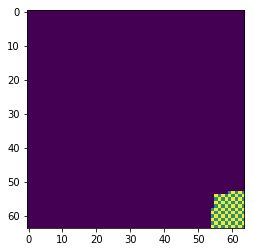
Diagrams in Alhambra are generated as SVG format, but are designed to be particularly easy to edit in Inkscape. Using xgrow output, we can also create a diagram of the layout, or plot it here:
xgrow_ts = ts.generate_xgrow_dict(perfect=True)
output = xgrow.run(xgrow_ts, {'block': 3, 'Gse': 10.9, 'smax': 100, 'size': 64}, outputopts='array')
%matplotlib inline
import matplotlib.pyplot as pyplot
pyplot.imshow(output['tiles'])
<matplotlib.image.AxesImage at 0x7f45bed3d2e8>
ts.create_layout_diagrams(output, 'layout-lattice.svg')
From here, we’d like to generate some sticky end sequences. We’ll use the “multimodel” algorithm in stickydesign, which will try to optimize for a few different coaxial stacking parameter sets.
ts_with_ends, newends = ts.create_end_sequences(method='multimodel', trials=20)
Now, we can see the end sequences:
ts_with_ends.ends
[End([('name', 'a'), ('type', 'TD'), ('fseq', 'ggtcctg')]),
 End([('name', 'b'), ('type', 'DT'), ('fseq', 'tgtctgg')])]
We can also plot histograms of the end interactions:
ts_with_ends.plot_se_hists();
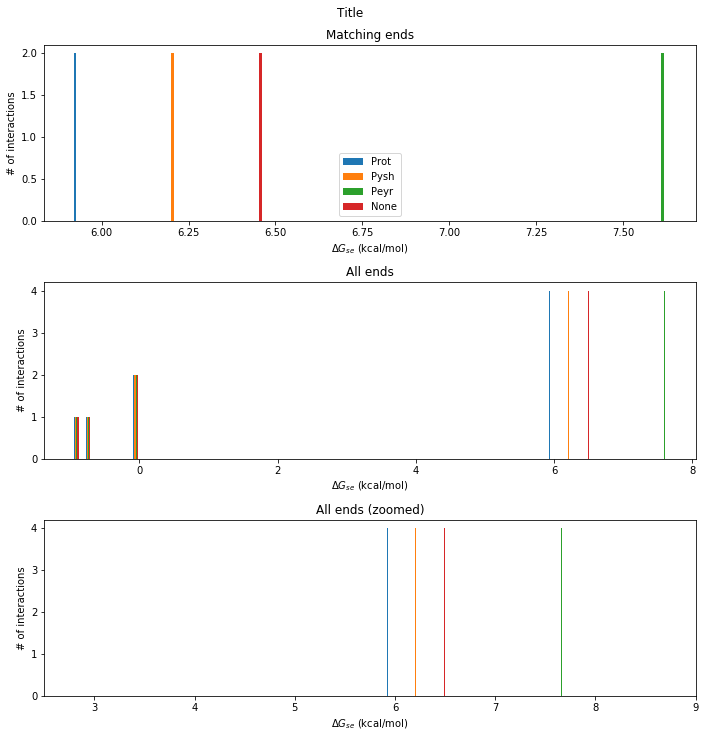
Unsurprisingly, for a system with 2 sticky ends, stickydesign can do very well.
Now that we have sticky end sequences, we can run xgrow simulations with energetics:
ts_with_ends.run_xgrow(perfect=False)
In a more complicated system, it might make sense to rearrange the sticky ends at this point, using TileSet.reorder_ends, but that doesn’t make sense for this system, which has exactly one end of each orientation. So we can move straight to designing strands:
ts_with_strands = ts_with_ends.create_strand_sequences()
Compiling 'alhambratemp' ...
Fixing sequences from file 'alhambratemp.fix'
System/component compiled into 'alhambratemp.pil'
Compiler state saved into 'alhambratemp.save'
Run a designer on 'alhambratemp.pil' and process the result with pepper-finish
Reading design from  file 'alhambratemp.pil'
Preparing constraints files for spuriousSSM.
spuriousSSM score=automatic template=alhambratemp-temp.st wc=alhambratemp-temp.wc eq=alhambratemp-temp.eq verboten_weak=1.5 quiet=ALL
Automatic: counted 256 base-pairing stacks in target structures.
Automatic: counted 134 unique base equivalence classes.

constrained S = <GTCCTGAATTACACCAGCCATGTCTG ATGGCTGGACCTAAGATTGAAGCACCCTAGATCGAAGCCCTGTAATTC AAGTAGCCTGCTTCAATCTTAGGTGGGCTTCGATCTAGGGACCTGATC GTCCTGATCAGGTGGCTACTTGTCTG  AGGACCATTACCACCTCACTCCAGAC GAGTGAGGACTCGGTCTGATTCCACCTGAATTACGTTCCCTGGTAATG GCGTCTCCTGGAATCAGACCGAGTGGGAACGTAATTCAGGACCCGTAG AGGACCTACGGGTGGAGACGCCAGAC>  N=304

Found 84 bases that can probably be changed freely.


spurious counts identity matches as well as WC matches.
spurious(testS, 3,8, testwc, testeq)
C =
   170    50     7     3     2     2
   533   150    38     9     2     0
   664   196    75    28    16     9
spurious0(testS, 3,8)
C0 =
   170    50     7     3     2     2
   653   254   126    81    58    44
   688   212    83    28    16     9
spurious1(testS, 5,10)
C1 =
    53    16     5     1     0     0
    83    29    13     7     4     2
   156    51    16     5     1     0
spurious: intraS =     0.01117, interS =     0.00302, interC  =     0.00135, beta = 5.000, mismatch = 25.000
verboten: weak   =     1.50000, strong =     2.00000, regular =     0.50000
** score_verboten score =   180.50000
** score_spurious score =   207.41493
** score_bonds    score =  -188.36308
** [verboten spurious bonds] = [    2.16216     1.00000     0.03906]-weighted score =   590.32727


       0 steps,        0 seconds : score =     590.3272655064 (bored=0,bmax=1609)
       1 steps,        0 seconds : score =     553.6007033032 (bored=0,bmax=1609)
       4 steps,        0 seconds : score =     537.3876095197 (bored=2,bmax=1609)
       6 steps,        0 seconds : score =     508.4153262333 (bored=1,bmax=1609)
       7 steps,        0 seconds : score =     420.8852967928 (bored=0,bmax=1609)
       8 steps,        0 seconds : score =     396.9926687314 (bored=0,bmax=1609)
       9 steps,        0 seconds : score =     373.8127953313 (bored=0,bmax=1609)
      10 steps,        0 seconds : score =     356.5639345694 (bored=0,bmax=1609)
      12 steps,        0 seconds : score =     350.3890216019 (bored=1,bmax=1609)
      16 steps,        0 seconds : score =     350.0066294596 (bored=3,bmax=1609)
      19 steps,        0 seconds : score =     324.8557458999 (bored=2,bmax=1609)
      21 steps,        0 seconds : score =     309.7981505308 (bored=1,bmax=1609)
      23 steps,        0 seconds : score =     300.1918789638 (bored=1,bmax=1609)
      31 steps,        0 seconds : score =     275.7384382269 (bored=7,bmax=1609)
      37 steps,        0 seconds : score =     272.9360416287 (bored=5,bmax=1609)
      39 steps,        0 seconds : score =     267.4043930206 (bored=1,bmax=1609)
      42 steps,        0 seconds : score =     266.7959695164 (bored=2,bmax=1609)
      44 steps,        0 seconds : score =     266.3384297947 (bored=1,bmax=1609)
      47 steps,        0 seconds : score =     266.2483358912 (bored=2,bmax=1609)
      49 steps,        0 seconds : score =     262.5314397981 (bored=1,bmax=1609)
      51 steps,        0 seconds : score =     260.8145953352 (bored=1,bmax=1609)
      55 steps,        0 seconds : score =     251.7416343680 (bored=3,bmax=1609)
      57 steps,        0 seconds : score =     232.3082061200 (bored=1,bmax=1609)
      58 steps,        0 seconds : score =     230.7778713441 (bored=0,bmax=1609)
      64 steps,        0 seconds : score =     229.1664706178 (bored=5,bmax=1609)
      68 steps,        0 seconds : score =     227.3346145983 (bored=3,bmax=1609)
      71 steps,        0 seconds : score =     221.9452698387 (bored=2,bmax=1609)
      86 steps,        0 seconds : score =     218.3523411128 (bored=14,bmax=1609)
      90 steps,        0 seconds : score =     196.9348701726 (bored=3,bmax=1609)
      92 steps,        0 seconds : score =     182.5998060459 (bored=1,bmax=1609)
      96 steps,        0 seconds : score =     179.6556334626 (bored=3,bmax=1609)
      98 steps,        0 seconds : score =     166.5392256293 (bored=1,bmax=1609)
     108 steps,        0 seconds : score =     153.7131511064 (bored=9,bmax=1609)
     118 steps,        0 seconds : score =     151.3579250978 (bored=9,bmax=1609)
     122 steps,        0 seconds : score =     150.9132908389 (bored=3,bmax=1609)
     131 steps,        0 seconds : score =     148.2278021911 (bored=8,bmax=1609)
     142 steps,        0 seconds : score =     146.9525534206 (bored=10,bmax=1609)
     143 steps,        0 seconds : score =     128.1905942641 (bored=0,bmax=1609)
     155 steps,        0 seconds : score =     126.7807805946 (bored=11,bmax=1609)
     163 steps,        0 seconds : score =     118.7691878067 (bored=7,bmax=1609)
     167 steps,        0 seconds : score =     116.2452302946 (bored=3,bmax=1609)
     168 steps,        0 seconds : score =     115.6405529157 (bored=0,bmax=1609)
     177 steps,        0 seconds : score =     113.7739023996 (bored=8,bmax=1609)
     180 steps,        0 seconds : score =     106.5021553046 (bored=2,bmax=1609)
     183 steps,        0 seconds : score =      92.9784921144 (bored=2,bmax=1609)
     189 steps,        0 seconds : score =      91.3801961025 (bored=5,bmax=1609)
     199 steps,        0 seconds : score =      87.1481997906 (bored=9,bmax=1609)
     209 steps,        0 seconds : score =      85.9371839629 (bored=9,bmax=1609)
     211 steps,        0 seconds : score =      85.5054930050 (bored=1,bmax=1609)
     221 steps,        0 seconds : score =      84.9806611661 (bored=9,bmax=1609)
     231 steps,        0 seconds : score =      70.9223971927 (bored=9,bmax=1609)
     233 steps,        0 seconds : score =      70.8377043353 (bored=1,bmax=1609)
     235 steps,        0 seconds : score =      70.4531205021 (bored=1,bmax=1609)
     236 steps,        0 seconds : score =      68.9876090262 (bored=0,bmax=1609)
     252 steps,        0 seconds : score =      68.9861467903 (bored=15,bmax=1609)
     268 steps,        0 seconds : score =      67.9893818449 (bored=15,bmax=1609)
     274 steps,        0 seconds : score =      67.7740891062 (bored=5,bmax=1609)
     290 steps,        0 seconds : score =      63.5255143872 (bored=15,bmax=1609)
     291 steps,        0 seconds : score =      62.5736147639 (bored=0,bmax=1609)
     298 steps,        0 seconds : score =      61.1101994963 (bored=6,bmax=1609)
     309 steps,        0 seconds : score =      60.9844205735 (bored=10,bmax=1609)
     310 steps,        0 seconds : score =      60.4153295768 (bored=0,bmax=1609)
     319 steps,        0 seconds : score =      59.3420502932 (bored=8,bmax=1609)
     320 steps,        0 seconds : score =      58.8918236628 (bored=0,bmax=1609)
     337 steps,        0 seconds : score =      47.8321906996 (bored=16,bmax=1609)
     340 steps,        0 seconds : score =      47.0533620804 (bored=2,bmax=1609)
     342 steps,        0 seconds : score =      45.3111598402 (bored=1,bmax=1609)
     388 steps,        0 seconds : score =      37.6384463190 (bored=45,bmax=1609)
     397 steps,        0 seconds : score =      34.6978273042 (bored=8,bmax=1609)
     402 steps,        0 seconds : score =      33.7153714627 (bored=4,bmax=1609)
     403 steps,        0 seconds : score =      31.7289062965 (bored=0,bmax=1609)
     416 steps,        0 seconds : score =      29.5390059692 (bored=12,bmax=1609)
     427 steps,        0 seconds : score =      27.3642686856 (bored=10,bmax=1609)
     429 steps,        0 seconds : score =      23.6884988604 (bored=1,bmax=1609)
     442 steps,        0 seconds : score =      21.4053049048 (bored=12,bmax=1609)
     452 steps,        0 seconds : score =      19.5896715209 (bored=9,bmax=1609)
     461 steps,        0 seconds : score =      17.8955200263 (bored=8,bmax=1609)
     467 steps,        0 seconds : score =      17.8282982203 (bored=5,bmax=1609)
     507 steps,        0 seconds : score =      17.6294509925 (bored=39,bmax=1609)
     531 steps,        0 seconds : score =      16.8671796360 (bored=23,bmax=1609)
     570 steps,        0 seconds : score =      16.6093321199 (bored=38,bmax=1609)
     591 steps,        0 seconds : score =      15.5406728908 (bored=20,bmax=1609)
     611 steps,        0 seconds : score =      14.8419371856 (bored=19,bmax=1609)
     679 steps,        0 seconds : score =      13.5994304748 (bored=67,bmax=1609)
     757 steps,        0 seconds : score =      13.5935901933 (bored=77,bmax=1609)
     838 steps,        0 seconds : score =      13.1666206176 (bored=80,bmax=1609)
     857 steps,        0 seconds : score =      13.0473955409 (bored=18,bmax=1609)
     879 steps,        0 seconds : score =      12.2807009763 (bored=21,bmax=1609)
     912 steps,        0 seconds : score =      10.7899402463 (bored=32,bmax=1609)
     963 steps,        0 seconds : score =      10.1923602330 (bored=50,bmax=1609)
    1047 steps,        0 seconds : score =       9.6898019056 (bored=83,bmax=1609)
    1058 steps,        0 seconds : score =       9.6148276072 (bored=10,bmax=1609)
    1065 steps,        0 seconds : score =       8.4398026567 (bored=6,bmax=1609)
    1169 steps,        1 seconds : score =       8.2184796575 (bored=103,bmax=1609)
    1173 steps,        1 seconds : score =       7.6318662406 (bored=3,bmax=1609)
    1276 steps,        1 seconds : score =       7.6019737895 (bored=102,bmax=1609)
    1281 steps,        1 seconds : score =       7.4767879990 (bored=4,bmax=1609)
    1304 steps,        1 seconds : score =       7.0887131823 (bored=22,bmax=1609)
    1441 steps,        1 seconds : score =       7.0798323670 (bored=136,bmax=1609)
    3049 steps,        1 seconds : score =       7.0798323670 FINAL

spurious counts identity matches as well as WC matches.
spurious(testS, 3,8, testwc, testeq)
C =
   152    26     0     0     0     0
   486   100    20     0     0     0
   704   173    27     3     0     0
spurious0(testS, 3,8)
C0 =
   152    26     0     0     0     0
   606   204   108    72    56    44
   728   189    35     3     0     0
spurious1(testS, 5,10)
C1 =
    49    10     2     0     0     0
   136    36     5     0     0     0
   163    46     6     0     0     0
spurious: intraS =     0.01117, interS =     0.00302, interC  =     0.00135, beta = 5.000, mismatch = 25.000
verboten: weak   =     1.50000, strong =     2.00000, regular =     0.50000
** score_verboten score =     0.00000
** score_spurious score =    14.91455
** score_bonds    score =  -200.56874
** [verboten spurious bonds] = [    2.16216     1.00000     0.03906]-weighted score =     7.07983


GTCCTGAGTCGCACCAACGCTGTCTG AGCGTTGGACTACCGATCCAGTCACCATCGTCCGAATGCCTGCGACTC ACGAAGCCTGACTGGATCGGTAGTGGCATTCGGACGATGGACAACGGC GTCCTGCCGTTGTGGCTTCGTGTCTG  AGGACCTTCAGCACCTAGCTCCAGAC GAGCTAGGACTGTGAGAGCATCCACCTCGGCTACGGTTCCTGCTGAAG GCAACACCTGGATGCTCTCACAGTGGAACCGTAGCCGAGGACGCCTTG AGGACCAAGGCGTGGTGTTGCCAGAC
Processing results of spuriousSSM.
Done, results saved to 'alhambratemp.mfe'
Finishing compilation of alhambratemp.save ...
Applying the design from 'alhambratemp.mfe'
Writing sequences file: alhambratemp.seqs
ts_with_strands.tiles
[Tile([('name', 'A'),
       ('structure', 'tile_daoe_5up'),
       ('ends', ['a', 'a', 'b', 'b']),
       ('fullseqs',
        ['GTCCTGAGTCGCACCAACGCTGTCTG',
         'AGCGTTGGACTACCGATCCAGTCACCATCGTCCGAATGCCTGCGACTC',
         'ACGAAGCCTGACTGGATCGGTAGTGGCATTCGGACGATGGACAACGGC',
         'GTCCTGCCGTTGTGGCTTCGTGTCTG']),
       ('label', 'both')]),
 Tile([('name', 'B'),
       ('structure', 'tile_daoe_3up'),
       ('ends', ['b/', 'b/', 'a/', 'a/']),
       ('fullseqs',
        ['AGGACCTTCAGCACCTAGCTCCAGAC',
         'GAGCTAGGACTGTGAGAGCATCCACCTCGGCTACGGTTCCTGCTGAAG',
         'GCAACACCTGGATGCTCTCACAGTGGAACCGTAGCCGAGGACGCCTTG',
         'AGGACCAAGGCGTGGTGTTGCCAGAC'])])]
At this point, it would be a good idea to check the consistency of all the strands, though Alhambra does this throughout its methods:
ts_with_strands.check_consistent()
We can now create sequence diagrams:
ts_with_strands.create_sequence_diagrams('sequences-lattice.svg')
Now, to order this system, we’d like an easy-to-use list of strands, but first, let’s put a biotin label on tile A:
ts_with_strands.tiles['A']['label'] = 'both'
ts_with_strands.strand_order_list
[('A-1', 'GTCCTGAGTCGCACCAACGCTGTCTG'),
 ('A-2', 'AGCGTTGGACTACCGA/iBiodT/CCAGTCACCATCGTCCGAATGCCTGCGACTC'),
 ('A-3', 'ACGAAGCCTGACTGGA/iBiodT/CGGTAGTGGCATTCGGACGATGGACAACGGC'),
 ('A-4', 'GTCCTGCCGTTGTGGCTTCGTGTCTG'),
 ('B-1', 'AGGACCTTCAGCACCTAGCTCCAGAC'),
 ('B-2', 'GAGCTAGGACTGTGAGAGCATCCACCTCGGCTACGGTTCCTGCTGAAG'),
 ('B-3', 'GCAACACCTGGATGCTCTCACAGTGGAACCGTAGCCGAGGACGCCTTG'),
 ('B-4', 'AGGACCAAGGCGTGGTGTTGCCAGAC')]
You can use standard Python techniques to output this any way you’d like (eg, using csv.writer or Pandas DataFrames)
More Complicated Systems
Seeds
Many tile systems start growth from a DNA origami or other pre-assembled seed structure, with “adapter tiles” that act as initial tiles. This is handled by the ‘seed’ entry in a tile system definition, and affects several parts of Alhambra:
The adapter tiles used by our currently-supported seed structures mimic tiles in the system, reusing one of the short strands of the tiles to present the same sticky ends. This means that their sequence is entirely determined by the origami sequence and tile sequence, and no further sequence design is necessary.
Simulations will use a seed if it is present in the TileSet, by creating a special “seed” tile and glue, along with adapter tiles, in the Xgrow input. However, the initial seed structure is not automatically added at the moment: use the “importfile” option in ‘xgrow_args’ or in arguments to Xgrow to add this. For tall rectangle seeds, “tallrect.seed” is in the examples folder.
To run simulations of a seeded TileSet without a seed, delete any “importfile” option in the system, and delete the ‘seed’ key in the set. Otherwise, the (fake) seed tiles may cause problems.
During tile and glue reduction, the changing of glues on adapters is done automatically. However, tile reduction may remove tiles that are used for adapters, which is not currently handled in sequence design, as they may be rotated versions of remaining tiles.
To generate sequences for the adapters (from tile and origami sequences) after all other sequences have been designed, use TileSet.create_adapter_sequences. Diagrams of the adapter sequences can be generated with TileSet.create_adapter_sequence_diagrams.
Rotated Tiles
While tiles in abstract models are usually considered to have fixed orientations, most DX tiles can attach in several different orientations. Alhambra supports the handling of such rotated tiles in several situations.
For simulations via TileSet.run_xgrow, rotated tiles can be included with the rotate=True parameter.
Reduction makes use of rotated tiles by default, and this can’t currently be changed. Thus, simulations after reduction should include rotated tiles.
The rotations of a Tile can be obtained using Tile.rotations.
Reduction
Tile or glue reduction ([EvWi2018]) of a TileSet is done through two methods: TileSet.reduce_tiles for tiles, and TileSet.reduce_ends for glues.
By default, each returns an “equiv” array that denotes what glues in the TileSet are equivalent (note that, if the set is modified, the equiv array may no longer be valid). These can use the Python multiprocessing library to run concurrently in multiple threads. As the searches are nondeterministic, multiple runs may give different results, and thus repeated tries are supported.
Reduction can try to preserve several things:
- ‘s2’ preserves second-order sensitive pairs, adding no new pairs.
- ‘s22’ preserves 2-by-2 sensitive pairs, adding no new pairs.
- ‘ld’ preserves small lattice defect formation, adding no new configurations of tiles that could allow them.
- ‘gs’ preserves glue “sense”: glues used as inputs will continue to be used only as inputs, and glues used as outputs will be used only as outputs.
Furthermore, reduction requires that our tiles specify “use annotations,” specifying how tiles attach.
With these added, to try to reduce the number of tile types in our system, we might try:
xor_equiv_tr = xor.reduce_tiles(preserve=['s22', 'ld'], tries=20, threads=5)
This will return an equiv that has the least number of tiles. Rather than applying this to our system, we can go on to reduce the number of glues/ends in the system, starting from the equiv:
xor_equiv_er = xor.reduce_tiles(preserve=['s22', 'ld'], tries=20, threads=5, initequiv=xor_equiv_tr)
Now, we can apply this to obtain a reduced-size TileSet:
xor_reduced = xor.apply_equiv(xor_equiv_er)
Note that, by default, reduction makes use of rotated tiles, so simulations of the new system may not work if rotation is not turned on. Additionally, merged tiles are not removed from the system: instead, they gain a “fake” key, with a value of the real tile that implements them.
Sticky End Sequence Assignment
For more complicated systems, it can make sense to try to optimize the assignment of sequences to particular abstract sticky ends, avoiding high spurious interactions between sensitive pairs of ends ([EvWi2013]; note that this does not use the new sensitivity definitions in [EvWi2018]). This can be performed with TileSet.reorder_ends: it should be done after sticky end sequences are generated, and before the tile/core sequences are generated.